I Built a String Editor That Writes Itself Out of Your Code
restringjs is an open source React library that lets non-developers edit text live on any page, then a CLI bakes those changes into your source files. The tool disappears.
I've been building a site for a client - a portfolio and booking site for her hair and makeup business. It's not quite ready to launch yet, but it's close. While I was putting it together, I set up the whole string system to be i18n-friendly from the start, which meant all the user-facing text lived in centralized config files. The plan was simple: I'd drop in placeholder copy, export the config to a spreadsheet, and she'd fill in the real text whenever she was ready.
That worked fine until I sent her the spreadsheet and got back: "It's tough for me to tell what text belongs where, so I can't tell if it'll feel right."
Which, in retrospect, is a completely reasonable thing to say. She's looking at a row in a spreadsheet that says hero.subtitle with a value of Professional hair and makeup services and she has no idea if that's the big text at the top, the small text under the photo, or the footer. Context matters for copy, and a spreadsheet has none.
So I did what any reasonable developer would do and wrote about 1,500 lines of bespoke override machinery. A custom sidebar, Turso database persistence, hand-rolled state management, the works. She could open the site in dev mode, click a little tab, see every string organized by section, edit them, and see changes reflected instantly on the page.
It functioned. It was also ugly, tightly coupled to one codebase, and if I ever wanted to use the same pattern on another project I'd be starting from scratch. After staring at it for a while I realized the core idea was actually pretty clean: register strings in your React components, let someone edit them in a sidebar, persist the overrides somewhere. The mess was all the plumbing I'd jammed into a single project. So I extracted it into a library.
restringjs
restringjs is a live string editor for React. You wrap your app in a provider, register strings with a hook, and a sidebar appears where anyone can search, filter, and edit every user-facing string in your app. Changes show up instantly.
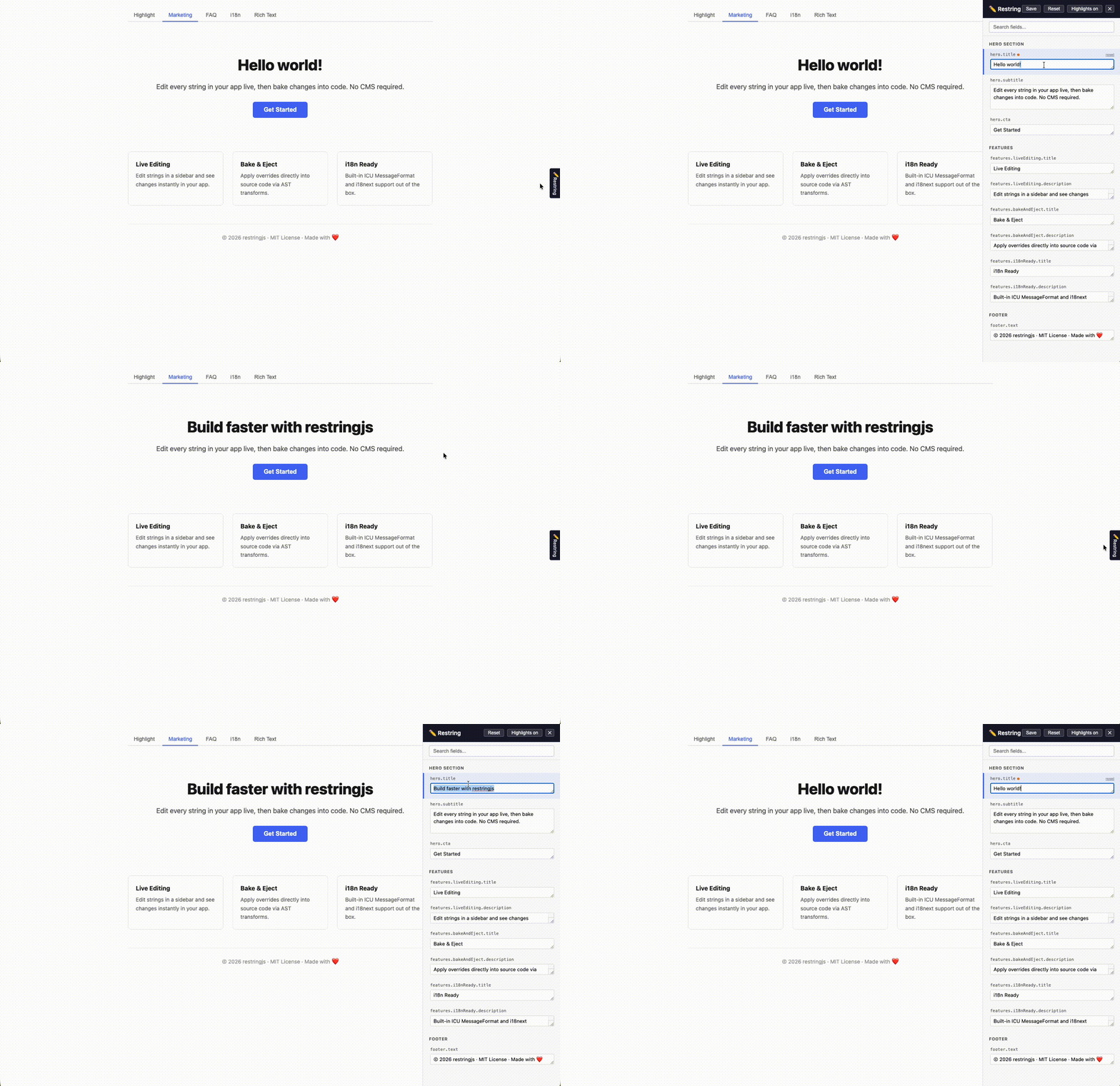
When you're happy with the edits, you run one command:
npx restringjs bake "src/**/*.tsx"
The CLI walks your source files, finds property assignments in your string config objects, and rewrites the values with the overrides. It uses ts-morph for AST transforms, so it preserves your formatting, your comments, your code structure. It's not doing regex find-and-replace, it understands the syntax tree.
After baking, the overrides become your new defaults. You can literally uninstall restringjs and nothing changes. Your strings are just hardcoded values again. The library writes itself out of your code.
That last part is the whole point. Most tools that solve this problem are runtime dependencies. You're locked into a CMS, or a translation service, or a visual editor that owns your rendering pipeline. restringjs is a development workflow tool. You use it to get text changes into code, and then it's done.
The API
The whole setup is pretty minimal. You register strings with useRestring, which takes a dot-path key and a default value:
import { useRestring } from 'restringjs';

function Hero() {
  const title = useRestring({
    path: 'hero.title',
    defaultValue: 'Welcome to our app',
    section: 'marketing',
  });

  const subtitle = useRestring({
    path: 'hero.subtitle',
    defaultValue: 'The best way to manage your strings',
    section: 'marketing',
  });

  return (
    <section>
      <h1>{title}</h1>
      <p>{subtitle}</p>
    </section>
  );
}
The provider wraps your app and gates on an enabled flag. If you conditionally import the sidebar and highlight components behind a dev check, they tree-shake out completely in production builds:
import { RestringProvider, RestringSidebar } from 'restringjs';
import { createLocalStorageAdapter } from 'restringjs/adapters';

const adapter = createLocalStorageAdapter();

function App() {
  return (
    <RestringProvider
      enabled={process.env.NODE_ENV === 'development'}
      adapter={adapter}
    >
      <YourApp />
      <RestringSidebar />
    </RestringProvider>
  );
}
The adapter interface is three async methods: load, save, clear. The library ships with memory, localStorage, and REST adapters, but you can plug in whatever backend you want. The original version was hardwired to Turso and that coupling was exactly what made it non-reusable, so the adapter pattern was one of the first things I got right in the extraction.
The parts I'm most proud of
Visual highlight mode
This was the feature that solved my client's original problem the most directly. RestringHighlight renders overlay borders on every registered DOM element on the page. You can see at a glance which text is editable, hover to see the field path, and click any highlighted element to jump straight to that field in the sidebar.
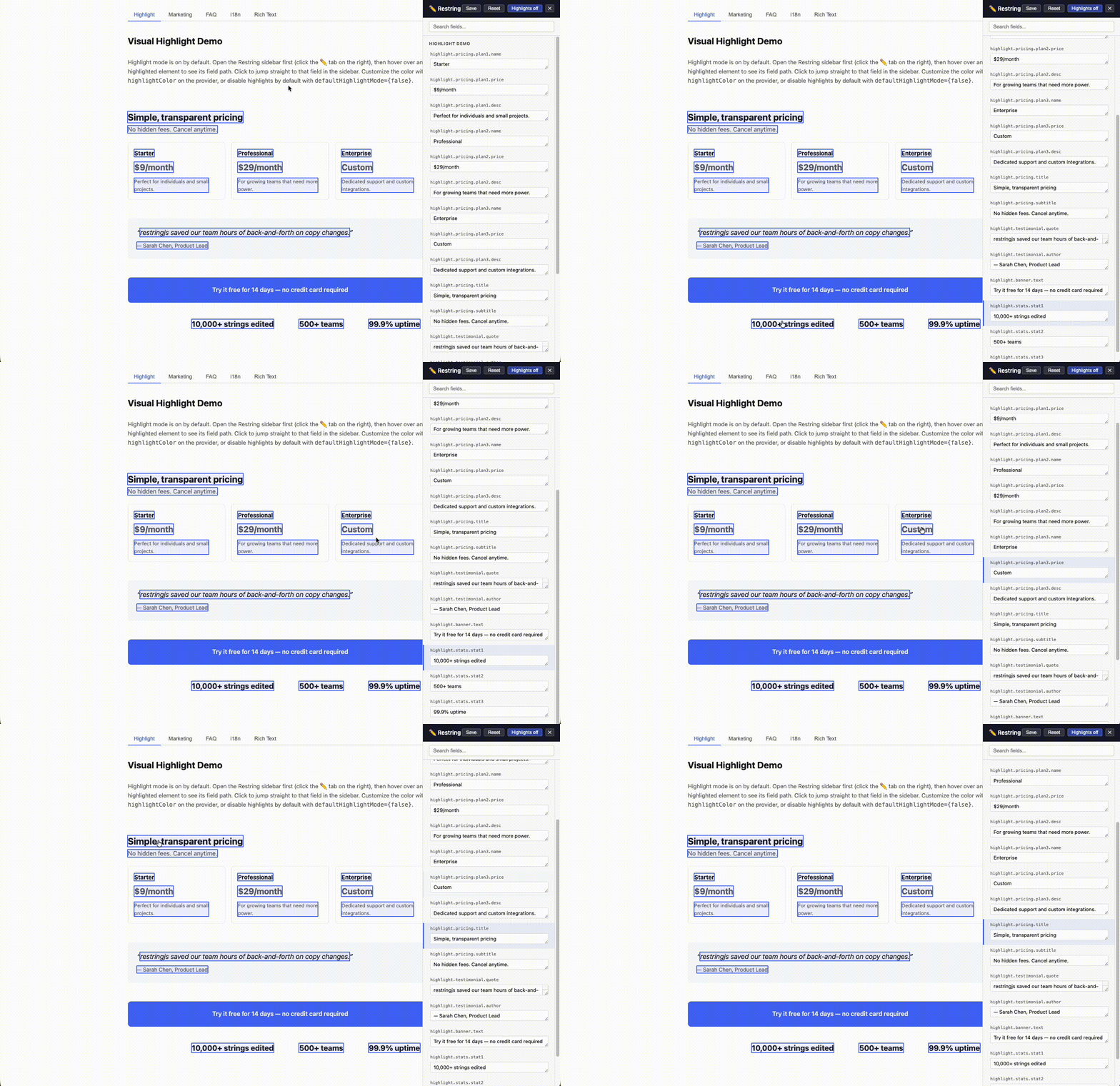
The overlays track scroll and resize using capture-phase event listeners, which was a fun exercise in understanding how browser event propagation actually works when you need to intercept everything without interfering with the app's own handlers. The highlight scanner also does interpolation template matching, so even strings with dynamic {variables} or {{i18next}} tokens get properly identified and highlighted in the DOM.
You can toggle highlights on and off globally, or hide them per-field if specific overlays are getting in the way of your editing flow. The sidebar also has edited field indicators, a green dot for persisted overrides and orange for unsaved changes, so you can always tell at a glance what's been touched.
ICU MessageFormat and i18next
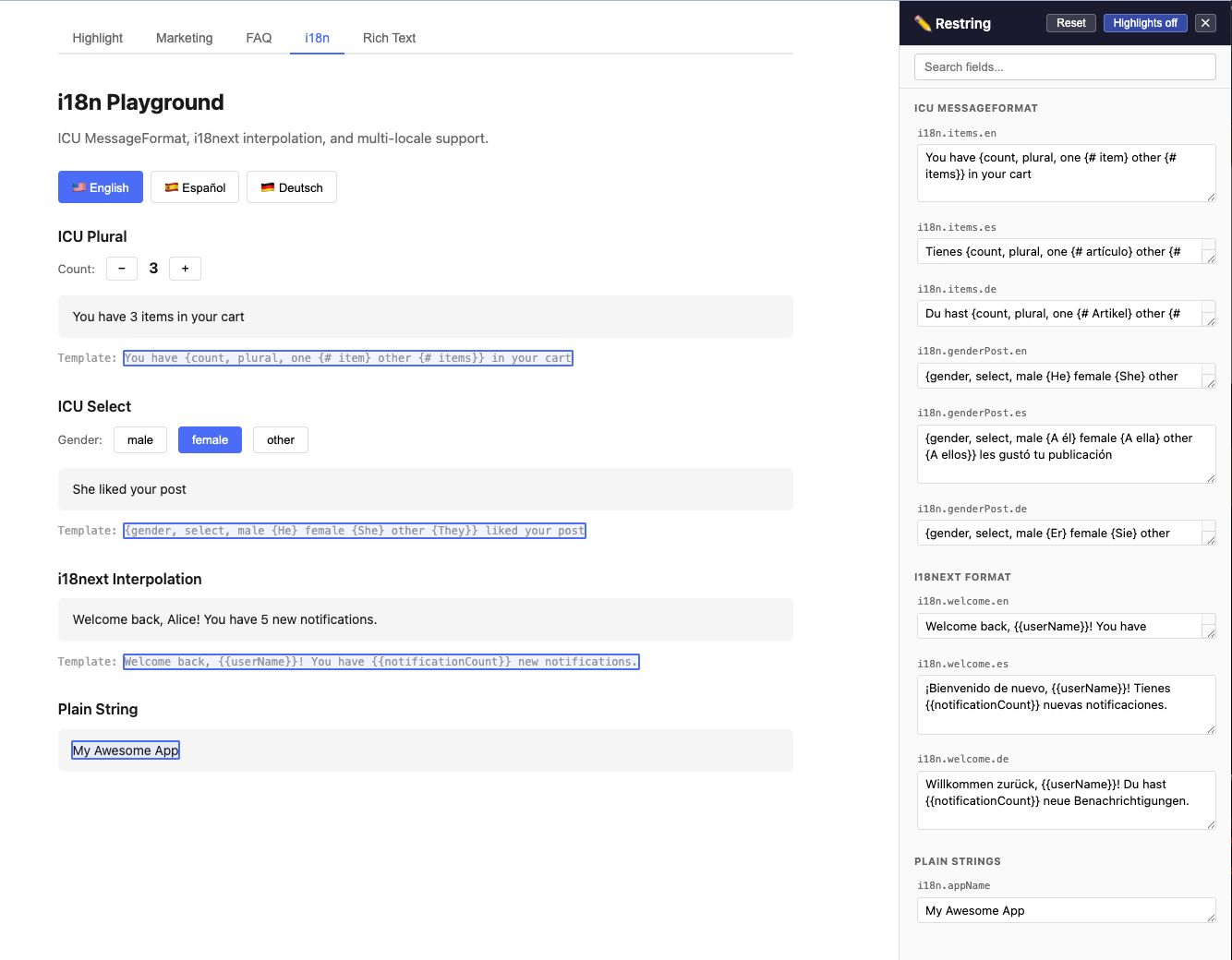
I added i18n support almost as an afterthought, but it ended up being one of the more interesting pieces. If you have a string like Hello {name}, you have {count, plural, one {# message} other {# messages}}, the sidebar detects the ICU pattern via regex, extracts the variable names, validates brace matching in real time, and groups plural forms using the browser's Intl.PluralRules for locale-aware labels. Same deal with i18next's {{variable}} and $t() patterns. The format detection is automatic, you don't need to tell restringjs what kind of string it's looking at.
AST transforms over regex
The bake command could have been a glorified find-and-replace. String matching would cover 80% of cases and take a fraction of the code. But the remaining 20%, multiline strings, template literals, strings with special characters, files with multiple useRestring calls sharing similar values, would produce subtle bugs that you wouldn't catch until production. ts-morph gives you the real syntax tree. I've worked with it pretty extensively at my day job building developer tools, so I already knew the API well enough to move fast. It's more code to write and it adds a dev dependency, but the output is correct.
useSyncExternalStore over context
The store uses React 18's useSyncExternalStore for state management instead of React context. Context-based state means every provider re-render cascades to every consumer. With useSyncExternalStore, each hook passes a selector that extracts just the field it cares about, and React skips the re-render if the selected value hasn't changed. The store itself notifies all subscribers on any change, but components only re-render when their specific field is different. For an editing tool where you might have 50+ registered strings on a page, that difference actually matters.
What it doesn't do
It doesn't handle images, layout, or anything beyond text strings. If you need a full visual page editor, something like Builder.io is a better fit. restringjs is surgical, it only touches strings.
It doesn't have auth or user management. The sidebar shows up when enabled is true. Controlling who sees it is on you, whether that's an environment variable, a feature flag, or a role check.
It doesn't replace i18next or react-intl for full internationalization workflows. It supports their string formats, but it's not a translation management system with translator workflows and locale branching.
The numbers
199 tests passing across the full suite. TypeScript strict mode with no any leakage in the public API. The bake command has solid test coverage, and the other CLI subcommands (diff, validate, export, import, clear) are stubbed out and on the roadmap. It also ships with Next.js helpers for both App Router and Pages Router if you need server-side rendering support.
It's on npm as restringjs and the source is at maki-q/restringjs on GitHub. MIT licensed. I'm actively dogfooding it by ripping out that original 1,500-line custom system and replacing it with the library, which has been a satisfying kind of demolition.
This is also my first real attempt at putting something into the open source world. If you've ever deployed a build just to fix a typo, or you're working with someone non-technical who needs to tweak copy without learning your toolchain, give it a look.
Comments
Join the discussionNo comments yet. Be the first to comment.

